
The level system rewards activity: each message and each minute spent in voice gives XP, XP raises the level, each level can unlock a role, and the bot announces level-ups with a card. The rules and settings are exactly those of the Discord version.
Settings are made on the dashboard's Levels page; the commands are described in Levels and leaderboards.
Turning the level system on
The system is off when the bot arrives. Turn it on on the dashboard's Levels page: XP is counted from then on, and !rank, !top, !modify-xp and !reset-levels become usable. Turning the system off stops counting; members' XP is kept.
Earning XP by chatting
The conditions, the computation and the delay between two messages.
Each message sent in a channel of the community can give XP. Direct messages don't count. For each message, the bot applies these rules in order:
- System on: otherwise nothing is counted.
- Who: bots, webhooks and Dispatch.IO blacklisted accounts earn nothing, nor does a message blocked by the anti-raid.
- 2-second delay between two messages that give XP.
- Content: the bot removes mentions, links and emojis. If nothing is left, the message gives nothing.
- Computation: a random whole number of XP between the min text XP and the max text XP (5 and 15 by default).
- Short message: fewer than 5 words or fewer than 20 characters, the XP is halved.
Earning XP in voice
A member earns the voice XP (20 by default) for each minute spent in a voice channel of the community, temporary voice channels included. Switching channels restarts the counter; leaving voice stops it. When the bot restarts, it resumes counting members already in voice. Bots and blacklisted accounts earn nothing.
The level curve
The formula and the XP steps.
The level depends on the total XP (messages + voice): reaching a level takes 100 × level² XP.
| Level | Total XP | Level | Total XP |
|---|---|---|---|
| 1 | 100 | 10 | 10,000 |
| 2 | 400 | 15 | 22,500 |
| 3 | 900 | 20 | 40,000 |
| 5 | 2,500 | 30 | 90,000 |
| 7 | 4,900 | 50 | 250,000 |
The level-up announcement
The message and card posted when a member levels up.
A level-up is detected after a message, a minute of voice or a giveaway that gives XP. The bot first gives the reward roles, then posts the announcement in the notification channel, in the community language:
- "Congrats to @Alex, who reached level 12!" (or "New role unlocked for @Alex: Level 10" when a reward exists for that level);
- the level card: avatar, "LEVEL UP", total XP, progress bar towards the next level, trophy with the level;
- the Show profile link, to the member's public page on the website (a button on Discord).
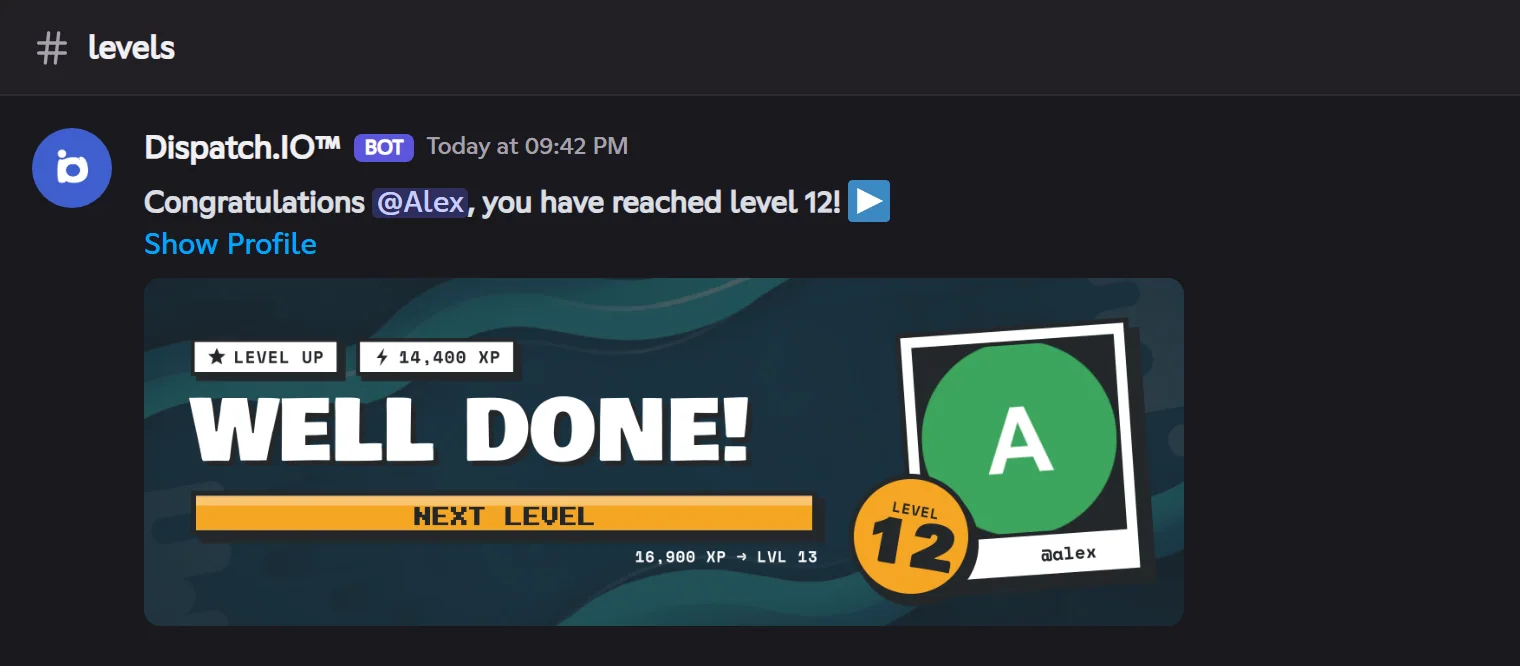
The card's background is the first available among: the member's personal background (Individual plan), the community's level image, its welcome image, then the default image. Without a notification channel, no announcement is posted, but XP and roles work.
Role rewards
Giving a role at a given level, permanently or temporarily.
A reward ties a role to a level (from 1 to 999, one role per level). On each level-up, the bot goes through every reward:
- Normal reward: the role is given if the new level is greater than or equal to its level. Roles add up and are never removed automatically.
- Temporary reward (Basic or Ultimate community): the role is given when reaching that exact level, then removed at the next level.
Rewards are only checked on level-ups
A reward added for level 5 while Alex is already level 8 will be given at his next level-up. The same goes after !modify-xp. Deleting a reward doesn't remove the role from those who have it.
To give a role, the bot needs Manage roles and the role must be below the bot's role (at an equal position, the older one wins).
Leaderboards and XP follow-up
| Tool | What it shows or does |
|---|---|
!rank | A member's rank card: position, level, XP |
!top | The community's leaderboard, 10 members per page |
| Website's public leaderboard | The leaderboard on the website, and each member's profile page (Leaderboards and rank cards) |
!modify-xp, !reset-levels | Correct or reset XP (administrators) |
| Website's Members & XP page | The member list sorted by XP, with editing and reset |
Settings, default values and Premium
| Setting | Default | Values |
|---|---|---|
| Turn levels on | Off | On or off |
| Notification channel | None | A text channel |
| Voice XP | 20 | 1 to 50 per minute |
| Text XP min — max | 5 — 15 | 1 to 50, max strictly greater than min |
| Role rewards | None | One role per level, levels 1 to 999 |
| Temporary role | No | Dispatch.IO Basic or Ultimate community |
| Level image | None | PNG, JPG, WEBP or GIF |
Common problems
| Problem | Likely cause and fix |
|---|---|
!rank replies that levels are off | Turn the system on on the dashboard. |
| No level-up announcement | No notification channel, or the bot lacks permissions there (Send messages, Attach files). |
| A member didn't get their role | Role above the bot's role, Manage roles missing, or reward added after their level-up. |
| A member spams but earns little | Normal: one message every 2 seconds at most counts, and short messages are halved. |
After !modify-xp, nothing was announced | Manual changes trigger neither announcement nor roles. |