
General commands are open to every member. They help you find help, learn about the community, a member or the bot, report a problem and have a bit of fun. The prefix used here is ! (the default prefix): replace it with your community's if it was changed.
| Command | What it is for |
|---|---|
!help | Every command, or the details of one |
!ping | The bot's latency |
!prefix | The community's prefix |
!info | Information about the bot, the community, a member, a role, a channel or an emoji |
!profil | A member's Dispatch.IO profile |
!premium | The community's plan and your account's |
!report | Report a message, a member or a bug |
!rename | Change a nickname |
!upload-image | Upload an image |
!translate | Translate a text or a message |
!giphy, !hello, !botlist | GIFs, politeness reminder, bot list |
Finding a command
!helpLists every bot command, sorted by category, or details one command.
Syntax
!help [command]Options
| Option | Type | Required | Description |
|---|---|---|---|
command | Text | No | Name or alias of a command (`warn`, `rang`…). |
Member permission
None
Where to use it
Community and direct messages
Rate limit
None
Plan
Free
Examples
!help!help timeout
On Discord, `/help` shows one category at a time with a menu; on Fluxer, every category is in the same message.
Result on Fluxer
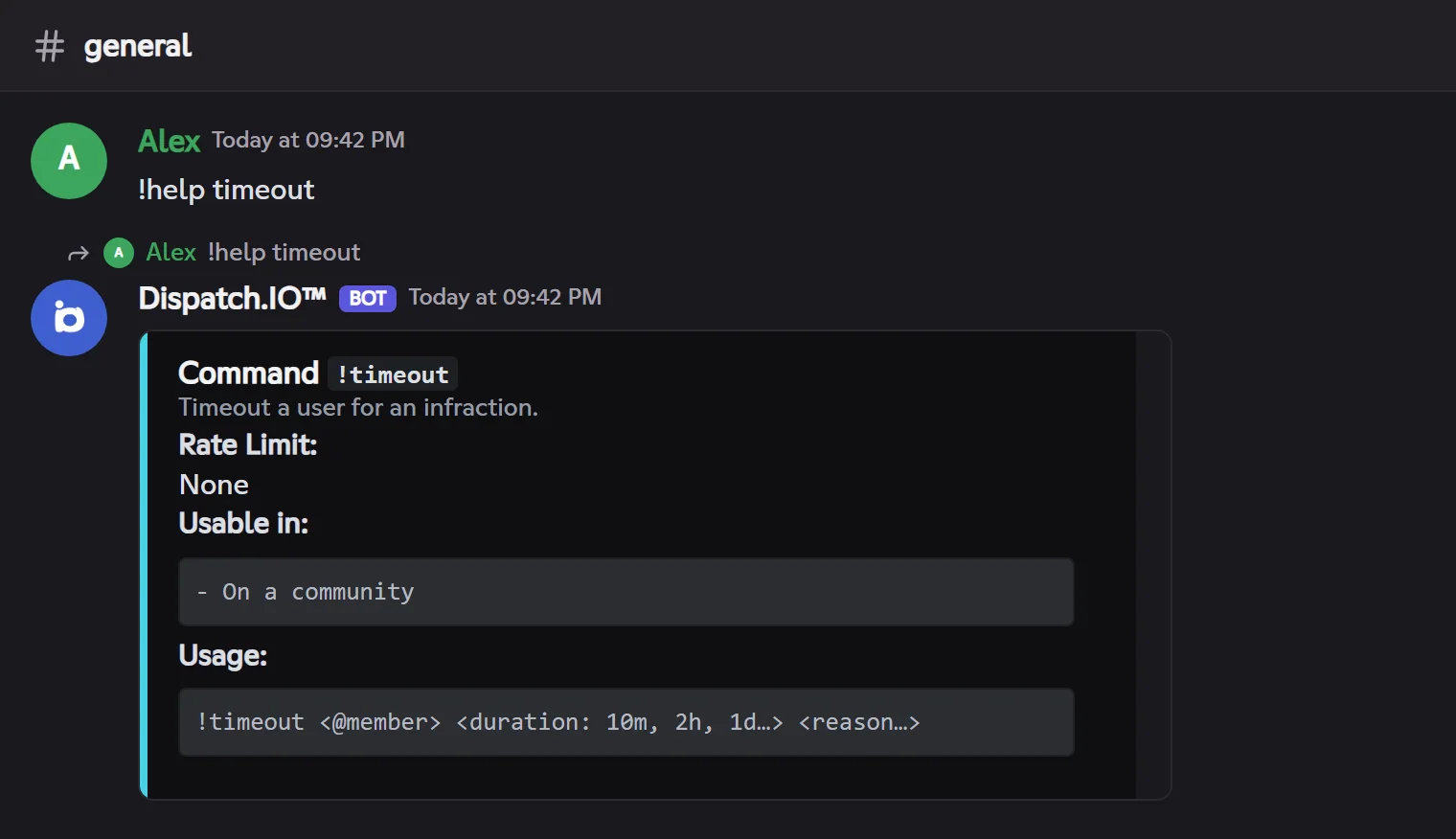
!help <command> shows the command's title, its description, its usage limit, where it works and the full syntax to type. Aliases work too: !aide, !commands.
Checking that the bot answers
!pingShows the bot's latency and a few technical details.
Syntax
!pingMember permission
None
Where to use it
Community and direct messages
Rate limit
None
Plan
Free
Examples
!ping
Result on Fluxer
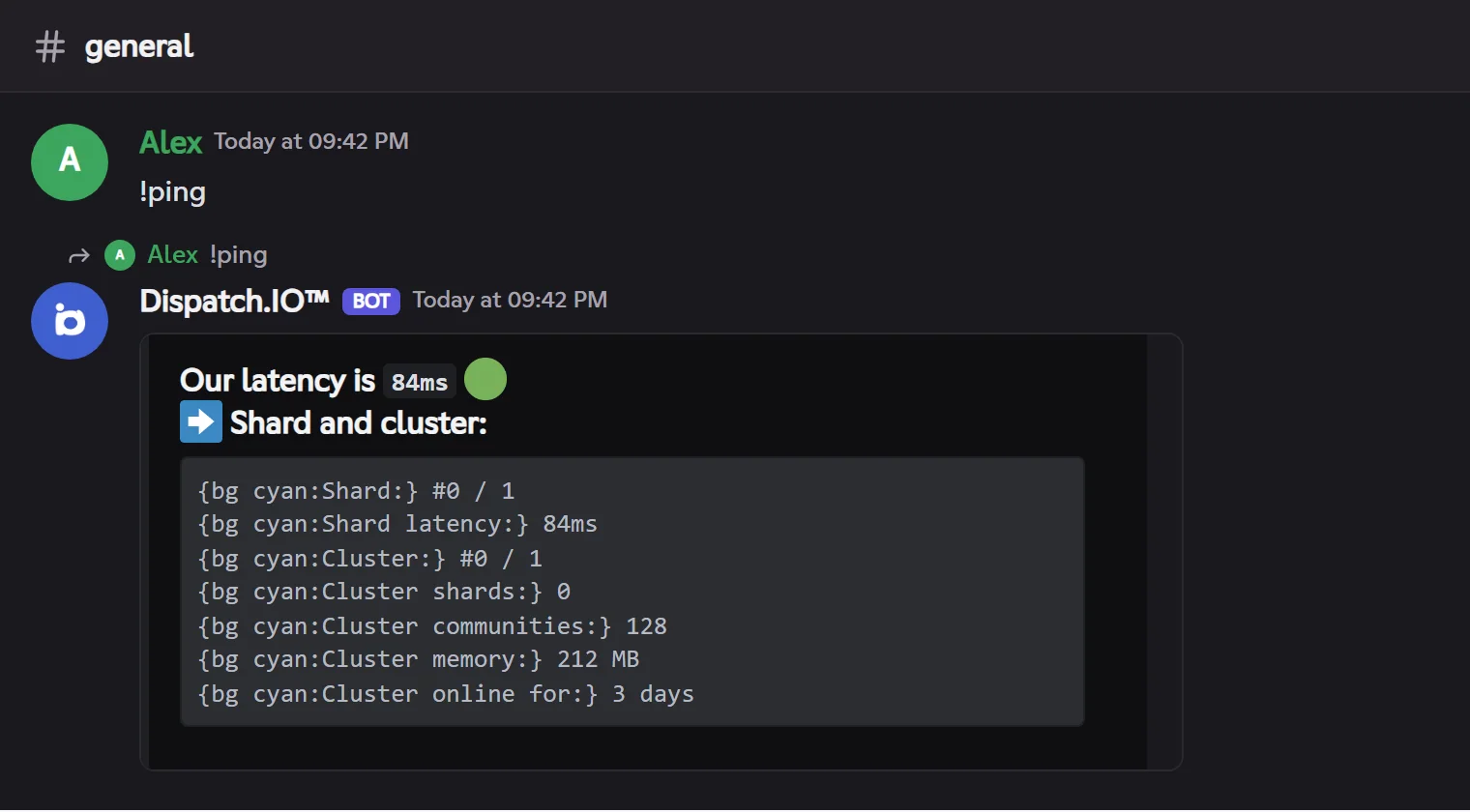
The measured latency is a round trip from the bot to Fluxer: 🟢 up to 160 ms, 🟡 up to 400 ms, 🟠 up to 1.5 s, 🔴 beyond. The block below gives the number of communities served, the memory used and the bot's uptime.
Showing or changing the prefix
!prefix shows the community's prefix; !prefix <new> changes it (Manage community permission). Details are in Bot configuration.
Getting information
!infoInformation about the bot, the community, a member, a role, a channel or an emoji.
Syntax
!info [app | server | user [@member] | role <@role> | channel [#channel] | emoji <emoji>]Options
| Option | Type | Required | Description |
|---|---|---|---|
app | Subcommand | No | The bot: version, communities served, support and website links. This is the default answer. |
server | Subcommand | No | The community: owner, creation date, members, channels, roles. |
user | Subcommand | No | A member (you by default): account, arrival in the community, roles, Dispatch.IO badges. |
role | Subcommand | No | A role: color, position, members, permissions. |
channel | Subcommand | No | A channel (this one by default): type, category, topic, creation. |
emoji | Subcommand | No | A custom emoji: name, ID, image. |
Member permission
None
Where to use it
Community (`app` also works in direct messages)
Rate limit
1 use every 10 s
Plan
Free
Examples
!info user @Alex!info role @Moderators
A member's card (!info user) carries three "buttons" as reactions: 🛡️ Verification (the account's status at Dispatch.IO), 🏠 In this community (their arrival, roles, level) and 📋 Mention. The answer goes by direct message to whoever clicks.
Viewing a profile
!profilShows a member's Dispatch.IO profile: badges, level, flames, achievements, plan.
Syntax
!profil [@member]Options
| Option | Type | Required | Description |
|---|---|---|---|
member | Member | No | The member to show (you by default). Alias: `!profile`. |
Member permission
None
Where to use it
Community and direct messages
Rate limit
1 use every 10 s
Plan
Free
Examples
!profil @Alex
Viewing Premium plans
!premiumPremium summary of the community and your account, with the links to manage your subscriptions.
Syntax
!premiumMember permission
None
Where to use it
Community and direct messages
Rate limit
2 uses every 10 s
Plan
Free
Examples
!premium
The answer arrives by direct message (it is about your account); your command disappears from the channel.
The summary gives the community's plan and its quotas, your Individual plan, and links to the website's billing page and to the community's Subscription page. See Premium plans and limits.
Reporting a message, a member or a bug
!reportReports a message or a member to the community's staff, or a bug to the Dispatch.IO team.
Syntax
!report <message | user | bug> …Options
| Option | Type | Required | Description |
|---|---|---|---|
message <link or id> <reason…> | Subcommand | No | The message to report, by its link or ID. You can also **reply** to the message with `!report <reason>`. |
user <@member> <reason…> | Subcommand | No | The member to report, with the reason. |
bug [description…] | Subcommand | No | A bot bug. Without a description, the bot sends you a website form. |
Member permission
None
Where to use it
Community (bug: also in direct messages)
Rate limit
2 uses every 60 s
Plan
Free
Examples
!report user @Alex Insults in direct messages!report bug The welcome card no longer shows
Attach a screenshot to your message: it is added to the report.
- A reported message or member goes to the community's Moderation & sanctions log channel (if set), with the reason, the author, the content and the link. You can't report your own messages, the bot's, or yourself.
- A bug goes to the Dispatch.IO team, with the community's name.
- Your command and the confirmation disappear after 5 seconds. Outside the official community, the bot adds the support link.
Changing a nickname
!renameChanges or removes your nickname in the community, or another member's.
Syntax
!rename [@member] [new nickname…]Options
| Option | Type | Required | Description |
|---|---|---|---|
member | Member | No | The member to rename (you by default). |
new nickname | Text | No | 32 characters at most. Without a nickname, the nickname is removed. |
Member permission
None for yourself (with *Change own nickname*); Manage nicknames for another member
Bot permission
Manage nicknames
Where to use it
Community only
Rate limit
1 use every 10 s
Plan
Free
Examples
!rename Alex the Great!rename @Lina
The owner can't be renamed, and the bot can only rename a member below its role. Aliases: `!nick`, `!pseudo`.
Uploading an image
!upload-imageUploads an image and gives its direct link, to reuse on the dashboard (welcome images, level images…).
Syntax
!upload-image (with the image attached to the message)Member permission
None
Where to use it
Community only
Rate limit
2 uses every 30 s
Plan
Free
Examples
!upload-image + screenshot.png
JPEG, PNG, WebP or GIF, 10 MB at most. The bot shows a preview: confirm with ✅ (2 minutes) or cancel with ❌. Alias: `!upload`.
Translating a message
!translateTranslates a text, or the message you reply to.
Syntax
!translate [language] [text…]Options
| Option | Type | Required | Description |
|---|---|---|---|
language | Code | No | Target language: `fr`, `en`, `es`, `de`, `it`, `pt`… |
text | Text | No | The text to translate. Without text, the message you reply to is translated. |
Member permission
None
Where to use it
Community and direct messages
Rate limit
3 uses every 20 s
Plan
Free
Examples
!translate fr Hello everyone(replying to a message) !translate en
The translation arrives by direct message, like Discord's "only you can see this" reply. Without a language, the bot sends you a website form to pick the source language, the target language and edit the text. Aliases: `!traduire`, `!tr`.
On Discord, translation is started from a message's Apps → Translate this menu. On Fluxer, reply to the message and type !translate.
GIFs and politeness
!giphySearches a GIF on Giphy and posts it in the channel.
Syntax
!giphy <title…> [--lang en]Options
| Option | Type | Required | Description |
|---|---|---|---|
title | Text | Yes | What you're looking for. |
--lang | Code | No | Search language (`fr`, `en`…). |
Member permission
None
Where to use it
Community and direct messages
Rate limit
2 uses every 20 s
Plan
Free
Examples
!giphy dancing cat
Alias: `!gif`.
!helloA funny reminder to say hello, with a GIF.
Syntax
!helloMember permission
None
Where to use it
Community and direct messages
Rate limit
1 use every 10 s
Plan
Free
Examples
!hello
Alias: `!bonjour`.
!botlistLists the community's bots: name, ID, creation date, arrival, Administrator permission.
Syntax
!botlistMember permission
None
Where to use it
Community only
Rate limit
1 use every 10 s
Plan
Free
Examples
!botlist
The list arrives by direct message, 5 bots per page (◀️ ▶️).