
The bump promotes your community: !bump posts its presentation in the bump channel of every Fluxer community using Dispatch.IO. Settings are made on the dashboard's Bump page.
The principle
- The network is every Fluxer community that turned bump on and picked a bump channel. It is mutual: to receive others' bumps, your community must be part of it too. The Fluxer network is separate from Discord's.
- Each community receives the presentation in its language and with its color.
- There is no reminder: the bot warns nobody when the delay is over.
Preparing the bump
| Setting (website's Bump page) | Default |
|---|---|
| Turn bump on | Off |
| Invite code (Generate button) | None |
| Bump receiving channel | None |
| Write the description (500 characters) | The community's description |
| Bump image | The welcome image, otherwise the default image |
- The invite must be permanent, otherwise the Join link eventually stops working. Generate reuses a permanent invite or creates one.
- The bump channel receives the other communities' bumps and is required to use
!bump. The bot must be able to write, embed links and attach files there (the card is an image).
Bumping
Any member can type !bump. The bot checks that bump is on, an invite is set, the bump channel exists and the delay is over. It shows "Bump in progress…", records the bump then sends the presentation to the whole network, and replaces its message with the result (communities reached, success rate). Its reply and your command disappear after 5 seconds, like Discord's private reply.
The posted presentation
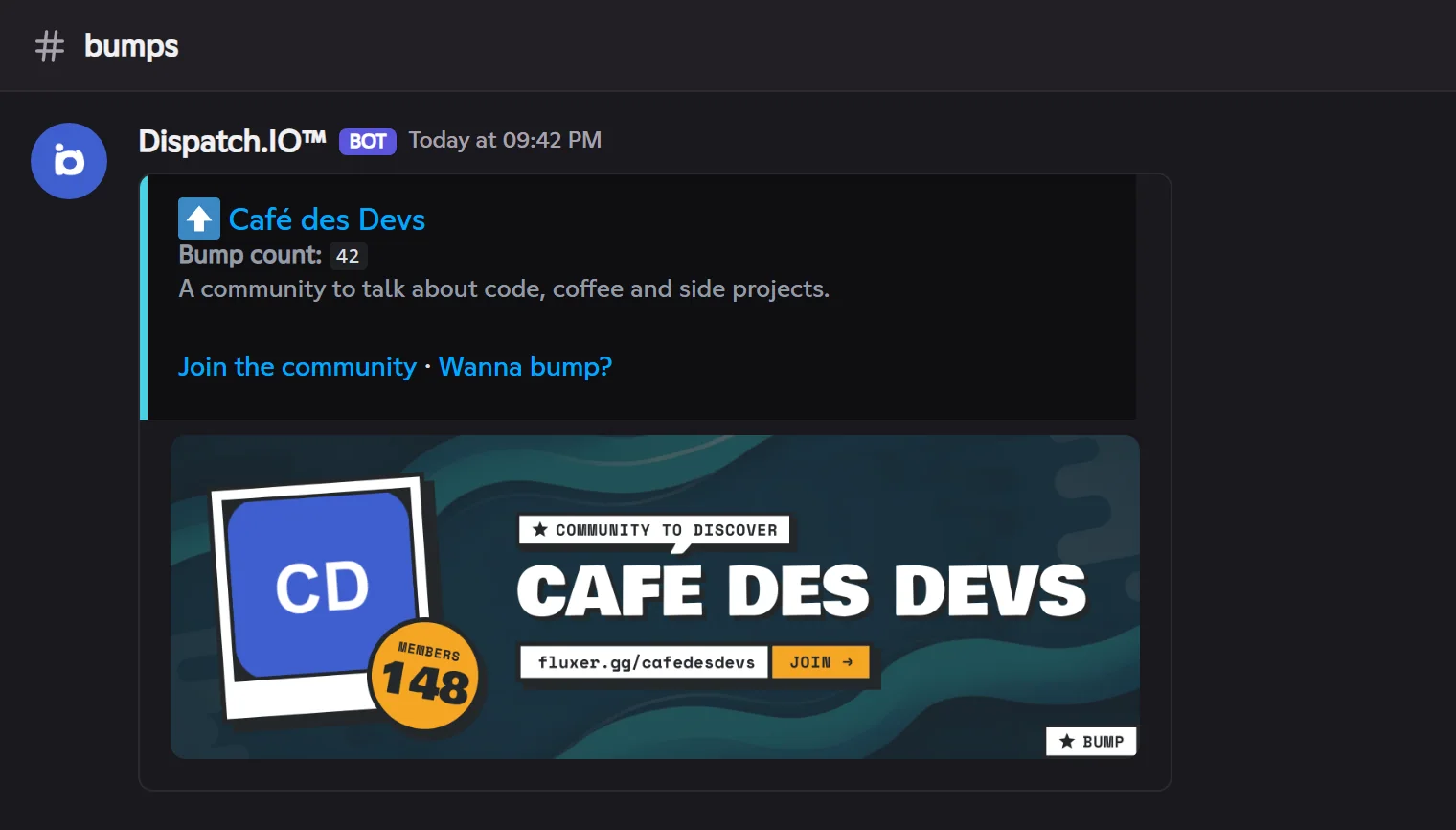
| Element | Content |
|---|---|
| Title | Your community's name, linking to your invite |
| Number of bumps | Your community's total bumps |
| Description | Your website description, otherwise the community's |
| Card | The community's icon (Fluxer's logo when it has none), its name, the number of members and the invite bar, on your bump image |
| Links | Join the community and Want to bump? (to add Dispatch.IO) |
On Fluxer there are no boosts: the "Boost level" line of the Discord version doesn't appear.
Delay between two bumps
The delay is shared by the whole community: once a member bumped, nobody can bump until the delay ends.
| Community plan | Delay |
|---|---|
| Free | 12 hours |
| Basic | 9 hours |
| Ultimate | 6 hours |
On top of that, each member can only run the command once every 20 seconds. During the delay, the bot shows the remaining time.
Pitfalls and limits
- Invite deleted: your presentation's Join link stops working; generate a new invite on the website.
- No reminder: check the Last bump on the website's Bump page.
- No presentation received: your community only receives bumps if bump is on there too, with a bump channel.