
On Discord, Dispatch.IO uses slash commands, buttons, select menus, input windows and "only you can see this" replies. Fluxer does not give these tools to bots yet. Rather than dropping features, Dispatch.IO replaces them with equivalents that work on Fluxer today. This page explains these four mechanisms: they come back throughout the documentation.
| On Discord | On Fluxer | Section |
|---|---|---|
| Slash command | Command with the community's prefix | Typing a command |
| Button | Reaction under the message, with a legend line | Buttons become reactions |
| Input window, select menu | Form on fluxer.dispatchio.xyz, link sent by direct message | Forms on the website |
| Reply only you can see | Reply deleted after 5 s, or a direct message | Private replies |
And when Fluxer adds buttons?
Fluxer has announced commands, buttons and input windows for bots. Dispatch.IO is built to switch at once: your panels, settings and messages will stay the same; only reactions and form links will become real buttons.
Typing a command
A command starts with the community's prefix, ! by default, followed by its name and its arguments separated by spaces:
!rank
!rank @Alex
!warn @Alex Spam in #general
!timeout @Alex 10m Flood
- You can also mention the bot instead of the prefix:
@Dispatch.IO help. Handy when you don't know the prefix. - A bare mention of the bot (nothing after it) shows its introduction, which reminds you of the community's prefix.
!helplists every command with its syntax;!help warndetails one command.- Members and roles are given by mention (
@Alex,@Moderators) or by ID; channels by mention (#general) or ID. - Durations are written
30s,10m,2h,7d,1w. - In a command card,
<argument>is required,[argument]optional and…means "the rest of the message" (a reason, a text).
The prefix is changed with !prefix <new> (see Bot configuration). A syntax error shows the right usage for 5 seconds.
Buttons become reactions
Where Discord shows buttons under a message, the bot's message shows a legend line saying what each emoji does, and the bot adds the same emojis as reactions:
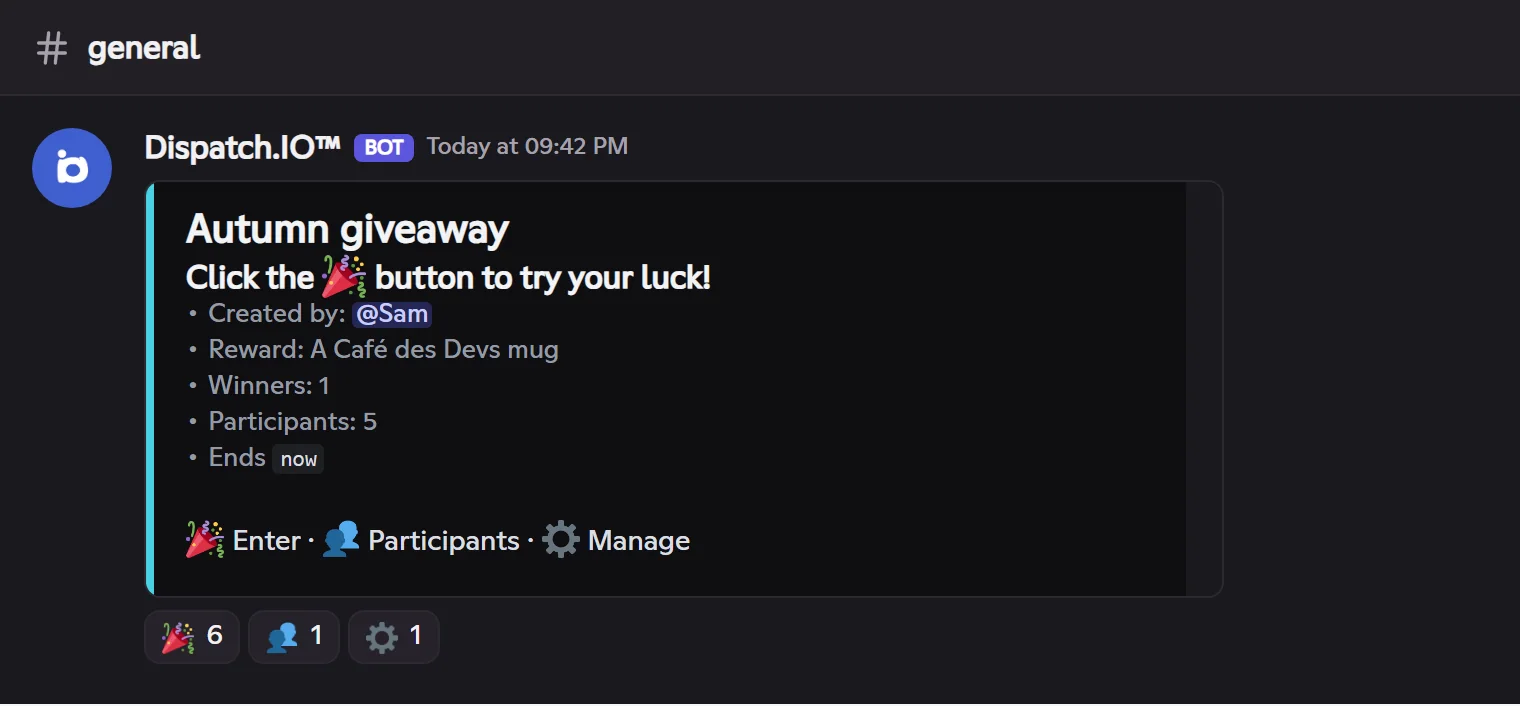
To press a button, click the matching reaction (its count goes to 2: yours and the bot's). The bot reacts according to the button:
| Kind of button | Example | What happens |
|---|---|---|
| One-off action | Take a role, open a ticket, approve a suggestion | The bot does the action then removes your reaction, so you can click again later. |
| Choice that stays | Enter a giveaway, vote in a poll, upvote a suggestion | Your reaction stays: it shows your choice. Remove it to undo (leave the giveaway, remove your vote). |
| Restricted button | Manage a giveaway, approve a suggestion, confirm a command | If you're not allowed, the bot removes your reaction and explains why by direct message (or for 5 s in the channel). |
A few reactions come back everywhere:
- ✅ / ❌: confirm or cancel a sensitive command (
!nuke,!raid-mode,!role-all…). Only the command's author can answer, within 30 seconds; other members' reactions are removed. - ◀️ / ▶️: turn the pages of a list (infractions, leaderboard, ban list…) for 5 minutes. Only the member who asked for the list turns the pages. In direct messages, adding or removing the arrow counts as a click (a bot can't remove your reaction in your DMs).
- 1️⃣ 2️⃣ 3️⃣…: replace a select menu (poll options, categories of a ticket panel), or a button that has no emoji on Discord.
Dispatch.IO's emojis
The bot uses its own custom emojis (those of the official community) everywhere, even in a community that has none. In plain text, Fluxer replaces them with the closest standard emoji.
Forms on the website
When Discord would open an input window or a menu (reason of a ticket, giveaway settings, poll question, answer to a suggestion…), Dispatch.IO opens a real form on the website and sends you the link by direct message:
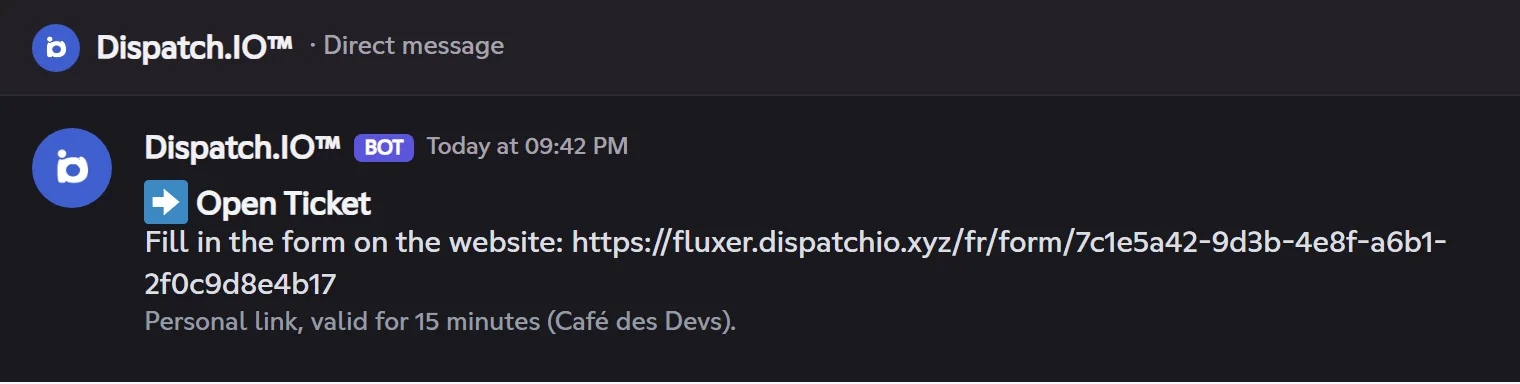
- Open the link: the page fluxer.dispatchio.xyz/en/form/… shows the same fields as the Discord window (texts, choice lists, checkboxes), already filled in when you are editing something.
- If you're not signed in, the website asks you to sign in with Fluxer: only the member the bot sent the link to can answer.
- Submit: the website shows the bot's answer ("Ticket created", "Poll published"…) and the bot acts in the community.
Rules to know:
- The link is personal and valid for 15 minutes, like a Discord window left open. After that, run the command again.
- A form can be used only once. A refused answer (missing field, out-of-range value) sends you a new pre-filled form when the command allows it.
- If your direct messages are closed, the link is posted in the channel for 15 seconds, with a mention: nobody else can use it.
Private replies
Fluxer has no "only you can see this" reply. Dispatch.IO does two things instead:
- Short replies (error, confirmation, "you don't have the permission"): they show in the channel then are deleted after 5 seconds, with your command. To delete your command, the bot needs Manage messages in the channel; without it, your command stays.
- Personal information (your infractions, the ban list, a giveaway's management panel, the participants…): it arrives by direct message, and your command disappears from the channel. If your DMs are closed, the reply shows for 5 seconds in the channel instead.
Open your direct messages
Many personal replies and every form link go through DMs. In Fluxer, allow direct messages from the community's members (the community's privacy settings) to get everything.
Answering in the channel
As on Discord, a few actions simply ask you to write the answer in the channel: the new name or the limit of a temporary voice channel, the member to add… The bot waits for your next message for 30 seconds, uses it, then deletes it. The anti-raid captcha works the same way: the code is typed in the captcha channel.