
Achievements reward members who take part: messages, voice, levels, flames, tickets, polls… Each unlocked achievement is announced with a banner, gives points and can give XP or a role. The catalog and rules are those of the Discord version.
Settings are made on the dashboard's Achievements page; !achievements shows a member's achievement card.
Turning achievements on
Turn the module on with the Turn achievements on switch of the Achievements page, then pick an achievements channel for the banners. Without a channel, achievements are still unlocked, but nothing is posted. Every achievement is on by default; you can turn one off, or a whole category, from the catalog. The module needs no Premium plan.
What is counted
The bot counts each member's activity while the system is on: messages, replies, mentions, files, links, GIFs, emojis, reactions, voice minutes, commands, music tracks, tickets, suggestions, polls, giveaways, bumps, counting… Level, flame, invites and seniority are read directly. Times (night, morning, midnight, weekend) follow the community's time zone. Bots don't unlock achievements.
Achievements impossible on Fluxer
Fluxer has no boosts, no Community or partner status, no vanity URL and no screen-share events: the achievements that depend on them (Booster, Level 3…) can't be unlocked on Fluxer. The Music category achievements, however, are unlocked with the music player.
The unlock banner
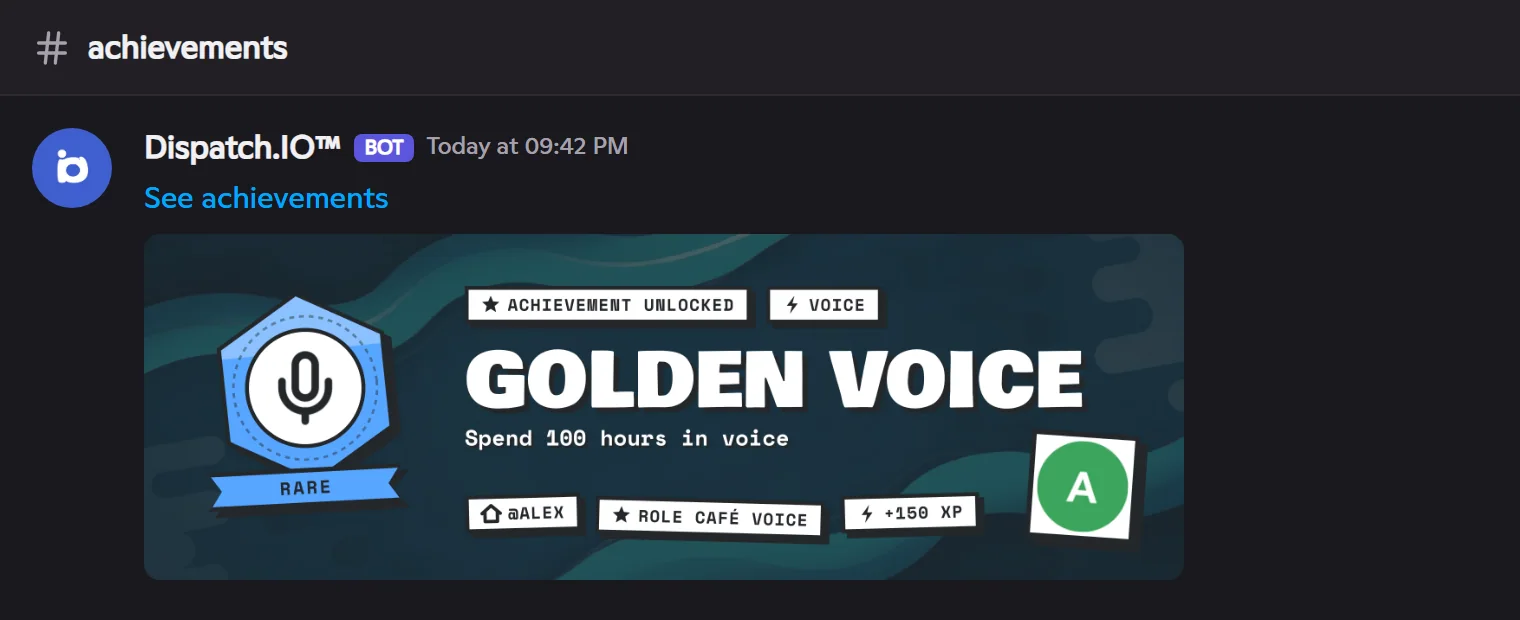
Each unlock is announced by an image in the achievements channel, without a mention: nobody is notified. The banner shows the member's avatar and name (or the community's icon and name for a community achievement), the medal, the achievement's name, description and rarity, the points, XP and role given, and the share of members who have it. Under a member's banner, the See achievements link opens their public page (a button on Discord).
Rarities
| Rarity | Points | Default XP |
|---|---|---|
| Common | 10 | 25 |
| Uncommon | 25 | 75 |
| Rare | 50 | 150 |
| Epic | 100 | 400 |
| Legendary | 250 | 1000 |
| Mythic | 500 | 2500 |
A member's score is the sum of their achievements' points.
Categories
| Category | What to do | Examples |
|---|---|---|
| Messages | Send 1 to 100,000 messages | First words, Chatterbox, Keyboard legend |
| Voice | Spend hours in voice, long sessions | First call, Golden voice, All-nighter |
| Levels | Reach levels 1 to 100 | Initiate, Grand master, Living legend |
| Flames | Keep a flame for 3 to 365 days, use freezes | Week on fire, Phoenix |
| Social | React, reply, mention, invite | Reactive, Influencer |
| Media | Share images, links, GIFs and emojis | First share, Movie buff |
| Community | Tickets, suggestions, polls, giveaways, bumps, counting | Need help, Lucky, To infinity |
| Music | Play tracks with the Dispatch.IO player | First note, Music lover |
| Dispatch.IO | Use the bot's commands | Hello Dispatch |
| Loyalty | Seniority and active days | One year already |
| Secrets | Hidden: found by chance | — |
| Account | The Fluxer account, in every community | Globe-trotter, Platinum |
| Whole community | The community's members, messages, voice, age, bumps, tickets, music tracks… | Small circle, Museum |
Rewards
Only member achievements give a reward, when an announced unlock happens:
- XP: the rarity's amount, or the one set for that achievement. The XP bonus and the level system must be on.
- Role: the role set for that achievement. The bot never gives a role with moderation or administration rights, nor a role placed above its own.
The silent catch-up
When the system is turned on (or an achievement turned back on), everything a member had already done is unlocked silently at their next activity: the achievement appears on their page and counts in their score, but without a banner, role or XP. This avoids hundreds of banners at once in a community that has been active for a long time.
Settings and default values
| Setting | Default |
|---|---|
| Achievement system | Off |
| Achievements channel | None |
| XP bonus | On |
| Banner image and dark veil | No image, veil on |
| Available achievements | The whole catalog |
| Rewards | None |
Common problems
| Problem | Cause | What to do |
|---|---|---|
| No banner is posted | No achievements channel, or the bot can't write there. | Pick a channel and check View channel, Send messages, Attach files. |
| Achievements without a banner | Silent catch-up. | Normal: only new achievements are announced. |
| No XP on unlock | XP bonus or levels off, reward set to 0 XP. | Check the Achievements and Levels pages. |
| The reward role is not given | Role above the bot's role or with sensitive rights. | Move the bot's role up, or pick another role. |