
Moderation commands sanction a member (warning, timeout, kick, ban, voice disconnection), lift a sanction and find a member's infraction history. This page is for the community's moderators and administrators.
On every sanction, Dispatch.IO checks that you're allowed to target that member, sends them a direct message, shows a confirmation in the channel, posts a log and records the infraction.
| Command | What it is for | Fluxer permission required |
|---|---|---|
!warn | Warn a member | Time out members |
!timeout | Mute a member for a duration | Time out members |
!end-timeout | End a timeout early | Time out members |
!kick | Kick a member from the community | Kick members |
!ban | Ban a user | Ban members |
!unban | Unban a user | Ban members |
!force-disconnect | Disconnect a member from a voice channel | Time out members |
!infractions | View (and delete) a member's infractions | None for your own infractions |
!snipe | Find a member's deleted messages in the logs | Time out members |
!banlist | The community's ban list | Ban members |
Before you start
The required permissions
For you. Each command requires a Fluxer permission (listed in its card). Without it, the bot replies "You need the … permission" for 5 seconds.
For the bot. Dispatch.IO needs the same permission as you, plus its basic permissions in the channel: View channel, Send messages, Embed links and Manage messages (to delete its temporary replies). For !timeout, !kick and !ban, the bot's role must also be placed above the targeted member's.
The sanctions log channel
To keep track of every sanction, pick a channel for the Moderation & sanctions category on the dashboard's Logs settings page (see Logs settings). Without that channel, sanctions work, but no log is posted.
Writing a sanction command
- The member is given by mention (
@Alex) or by ID. - The reason is all the text that follows:
!warn @Alex Spam in #general. - Durations are written
30s,10m,2h,7d,1w.
Who can sanction whom
Before applying a sanction, Dispatch.IO checks the target. If a rule blocks, the bot replies with an explanation (for example "Only the owner or an administrator can warn a moderator.") and nothing is applied or recorded.
| Rule | !warn | !timeout | !end-timeout | !kick | !ban | !unban | !force-disconnect |
|---|---|---|---|---|---|---|---|
| The community owner can't be targeted | — | ✔ | — | ✔ | ✔ | ✔ | — |
| The member must be in the community | ✔ | ✔ | ✔ | ✔ | — | must be banned | ✔ |
| Your highest role must be above theirs | — | ✔ | — | ✔ | ✔ | — | — |
| The bot's highest role must be above theirs | — | ✔ | — | ✔ | ✔ | — | — |
| A member with an ADMIN role can only be targeted by the owner | ✔ | ✔ | ✔ | ✔ | ✔ | — | ✔ |
| A member with a MODO role can only be targeted by the owner or an administrator | ✔ | ✔ | ✔ | ✔ | ✔ | — | ✔ |
✔ = the rule applies · — = no check for this command. "Above" follows Fluxer's rule: at an equal position, the older role wins (see Permissions and roles).
What happens after a sanction
- The infraction is recorded in the member's history (see Viewing and deleting infractions).
- The member gets a direct message with the sanction, the reason, the moderator and the community's name, with the moderation banner. It is sent before the sanction, so the member can still receive it. If their DMs are closed, the sanction applies anyway.
- The confirmation shows in the channel where you ran the command.
- A log is posted in the Moderation & sanctions channel: sanction type, moderator, targeted member and reason, with the date.
Getting notified of sanctions
Sanction logs are critical. If you turn on Emergency mentions & alerts in the basic configuration (dashboard), the chosen roles or members are mentioned in each sanction log (the owner if nobody is chosen).
Note
There is no automatic escalation: piling up warnings doesn't trigger a timeout or a ban. Automatic sanctions belong to the Anti-raid and security module.
Warning a member
!warnWarns a member, notifies them by direct message and records the warning in their infractions.
Syntax
!warn <@member> <reason…>Options
| Option | Type | Required | Description |
|---|---|---|---|
member | Member | Yes | The member to warn (mention or ID). |
reason | Text | Yes | The reason, sent to the member and recorded. |
Member permission
Time out members
Where to use it
Community only
Rate limit
3 uses every 10 s
Plan
Free
Examples
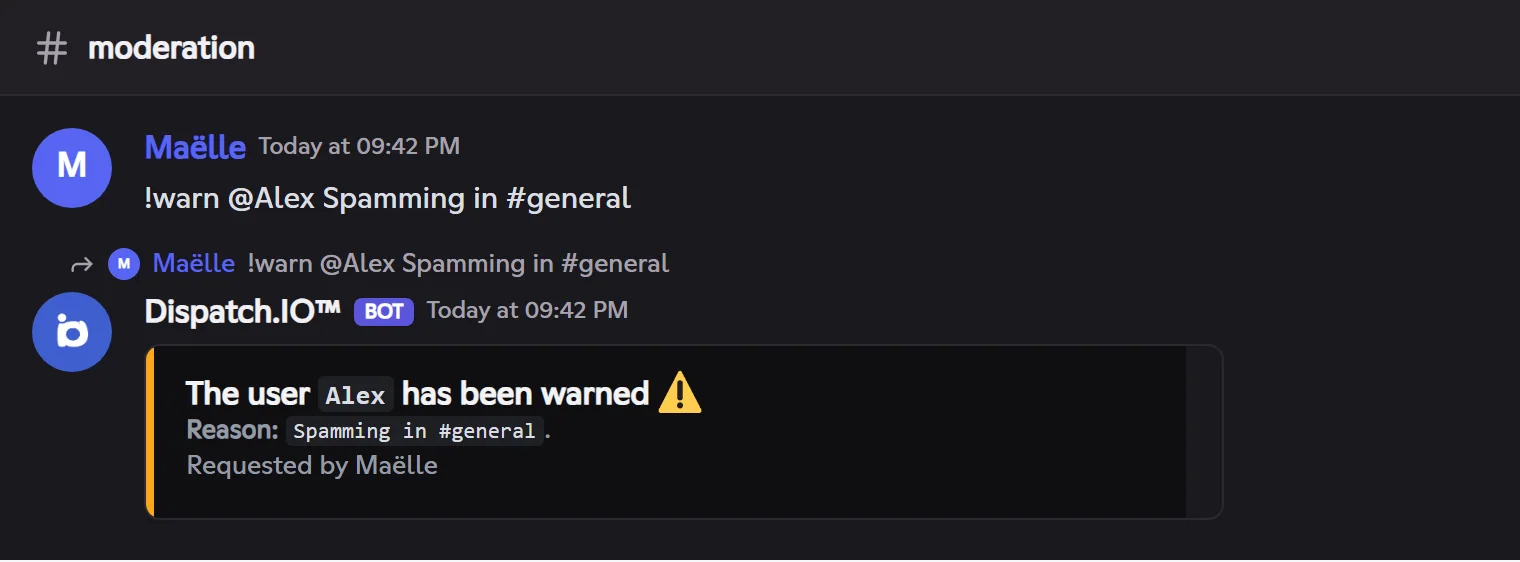
!warn @Alex Spam in #general
Result on Fluxer
Muting a member (timeout)
!timeoutTimes a member out: they can no longer write, react or speak in voice until the delay ends.
Syntax
!timeout <@member> <duration> <reason…>Options
| Option | Type | Required | Description |
|---|---|---|---|
member | Member | Yes | The member to time out. |
duration | Duration | Yes | From `1m` to `28d`: `10m`, `2h`, `1d`, `1w`… |
reason | Text | Yes | The reason, sent to the member. |
Member permission
Time out members
Bot permission
Time out members
Where to use it
Community only
Rate limit
3 uses every 10 s
Plan
Free
Examples
!timeout @Alex 10m Flood
Alias: `!mute`. A member already timed out has their timeout replaced by the new duration.
!end-timeoutEnds a member's timeout early.
Syntax
!end-timeout <@member>Member permission
Time out members
Bot permission
Time out members
Where to use it
Community only
Rate limit
3 uses every 10 s
Plan
Free
Examples
!end-timeout @Alex
Aliases: `!untimeout`, `!unmute`.
Kicking a member
!kickKicks a member from the community. They can come back with an invite.
Syntax
!kick <@member> <reason…>Member permission
Kick members
Bot permission
Kick members
Where to use it
Community only
Rate limit
3 uses every 10 s
Plan
Free
Examples
!kick @Alex Advertising in direct messages
Banning and unbanning
!banBans a user from the community, present or not.
Syntax
!ban <@member | id> <reason…> [--delete]Options
| Option | Type | Required | Description |
|---|---|---|---|
member | Member or ID | Yes | A member, or the ID of a user who isn't in the community. |
reason | Text | Yes | The reason, sent to the member and recorded. |
--delete | Flag | No | Also deletes their messages of the last 7 days (`-d` works too). |
Member permission
Ban members
Bot permission
Ban members
Where to use it
Community only
Rate limit
3 uses every 10 s
Plan
Free
Examples
!ban @Alex Raid --delete
!unbanUnbans a user.
Syntax
!unban <id> [reason…]Options
| Option | Type | Required | Description |
|---|---|---|---|
id | ID | Yes | The banned user's ID (see `!banlist`). |
Member permission
Ban members
Bot permission
Ban members
Where to use it
Community only
Rate limit
3 uses every 10 s
Plan
Free
Examples
!unban 100000000000001001 Moderation mistake
!banlistLists the community's banned users, with each ban's reason.
Syntax
!banlistMember permission
Ban members
Bot permission
Ban members
Where to use it
Community only
Rate limit
1 use every 10 s
Plan
Free
Examples
!banlist
The list arrives by direct message, 8 bans per page (◀️ ▶️).
Disconnecting a member from voice
!force-disconnectDisconnects a member from their voice channel and records a "voice disconnection" infraction.
Syntax
!force-disconnect <@member> <reason…>Member permission
Time out members
Bot permission
Time out members
Where to use it
Community only
Rate limit
3 uses every 10 s
Plan
Free
Examples
!force-disconnect @Alex Music too loud
Alias: `!disconnect`. The member must be in voice.
Viewing and deleting infractions
!infractionsShows a member's infractions (warnings, timeouts, kicks, bans, disconnections) with their date, reason and moderator.
Syntax
!infractions [@member]Options
| Option | Type | Required | Description |
|---|---|---|---|
member | Member | No | The member to view. Without it, your own infractions. |
Member permission
None for yours; Time out members (or a MODO role) for another member
Where to use it
Community only
Rate limit
1 use every 10 s
Plan
Free
Examples
!infractions @Alex
The list arrives by direct message, 3 infractions per page (◀️ ▶️). Alias: `!sanctions`.
Deleting an infraction. The owner and members with Administrator also get, by direct message, the link to a website form listing the infractions: pick the one to delete and submit. An Infraction deleted log is posted. The link is valid for 15 minutes.
Finding deleted messages
!snipeFinds a member's deleted messages by reading back the message logs channel.
Syntax
!snipe <@member>Member permission
Time out members
Where to use it
Community only
Rate limit
1 use every 30 s
Plan
Free
Examples
!snipe @Alex
A channel is needed for the **Messages** log category. The messages arrive by direct message, 3 per page (◀️ ▶️). A log is posted.
Sanctioning from the dashboard
Moderators can also sanction a ticket's author from the ticket's space on the dashboard (the ticket's moderation panel, see Tickets). The bot applies the sanction exactly as with a command: direct message, infraction and Sanction from the dashboard log.