
Dispatch.IO's security protects your community against spam, malicious accounts and raids. Settings and thresholds are those of the Discord version; everything is set on the dashboard's Security and anti-raid page.
Overview
| Building block | What it does | Where to set it |
|---|---|---|
| Anti-raid | Detects dangerous behavior in messages or on arrival, sanctions its author | Anti-Raid page of the website |
| Captcha | Makes newcomers type a code before welcoming them | Anti-Raid page of the website |
| Raid mode | Emergency button during an attack | !raid-mode, Security page of the website |
| Whitelist | Exempts members, roles or bots from some protections | Security page of the website |
| Emergency mentions | Mention the staff in important logs | Basic configuration page of the website |
Community protections (channels, bans, invites, webhooks)
On Discord, the anti-raid also watches mass channel creations and deletions, mass bans, invites, webhooks and server changes. These protections are not active on Fluxer yet: on Fluxer, the anti-raid covers messages and arrivals. The community's logs (channels, roles, invites…) stay available, see Logs.
Before you start
- Turning on: main anti-raid switch, then each protection, on the Anti-Raid page.
- Bot permissions: Manage messages (deleting), Time out members (timeouts), Kick members and Ban members (arrivals, honeypot), with a role placed above the members to sanction.
- Never sanctioned: the bot itself, the owner and Dispatch.IO's creators, plus the whitelist for the protections its scope covers. Webhook messages are not filtered.
- Thresholds: shared by every community and set by the Dispatch.IO team; only the minimum age of recent accounts is set per community.
Warnings and sanctions
For links, mention abuse and forbidden words, each offending message is deleted and gives a warning: an infraction is recorded, the member gets a direct message and the raid logs channel gets a log. On the 3rd warning within the protection's time window, the member gets a 24-hour timeout. Spam is stricter: a 24-hour timeout on the first detection.
Each warning and timeout is recorded as an infraction in the bot's name (!infractions).
Message filters
Spam, links, mention abuse and forbidden words.
| Protection | Default trigger | Sanction |
|---|---|---|
| Anti-spam | 5 messages in 5 seconds | Immediate 24-hour timeout |
| Links | Each link outside the allowed channels | Warning, 24-hour timeout on the 3rd in 60 seconds |
| Mention abuse | More than 5 mentions in a message, or 3 messages with mentions in 30 seconds | Warning, 24-hour timeout on the 3rd in 30 seconds |
| Forbidden words | Each message containing a forbidden word | Warning, 24-hour timeout on the 3rd in 24 hours |
- Links: the channels allowed for links and open ticket channels are exempt.
- Forbidden words: a built-in list (insults, hate speech, threats, scams, in French and English), always on, plus your own words. Detection ignores case and accents and recognizes separated letters (
s.p.a.c.e.d) or letters replaced by digits (3for e).
Caution
Forbidden words are searched anywhere, even inside another word: a short word can trigger on innocent words.
Honeypot channel
A channel where only spam bots write.
The honeypot is a channel where no member has a reason to write. Spam bots and hacked accounts post everywhere, this channel included: as soon as an account writes in it, the bot sanctions it.
- Turn on the Honeypot protection and pick the channel (or let the bot create it).
- Pick the sanction: softban (default: ban then unban, their messages of the last hour wiped), kick, ban, or a 1-hour, 24-hour or 7-day timeout.
- The bot posts in the channel the message "DO NOT SEND MESSAGES IN THIS CHANNEL", with the counter of caught accounts.
When an account writes in it: its message is deleted, it gets a direct message, the sanction is applied and recorded, the counter goes up and a log is posted. The owner, administrators, Dispatch.IO's creators and the whitelist are never sanctioned (their messages are still deleted). An account is only sanctioned once a minute.
Join control
Bots, mass joins, recent accounts and captcha.
| Protection | Trigger | Action |
|---|---|---|
| Bot addition | Any bot added to the community, if it isn't on the whitelist | The bot is kicked; whoever added it gets a warning if they aren't an administrator. |
| Mass joins | The 6th newcomer in 10 seconds | Each member who joined during those 10 seconds gets a direct message then is kicked. |
| Recent accounts | A Fluxer account created less than 7 days ago (adjustable from 0 to 365) | Direct message then kick; banned on the 3rd attempt. |
Tip
Before installing another bot, add it to the whitelist with the App addition scope: otherwise the anti-raid kicks it, even if the owner adds it.
Captcha
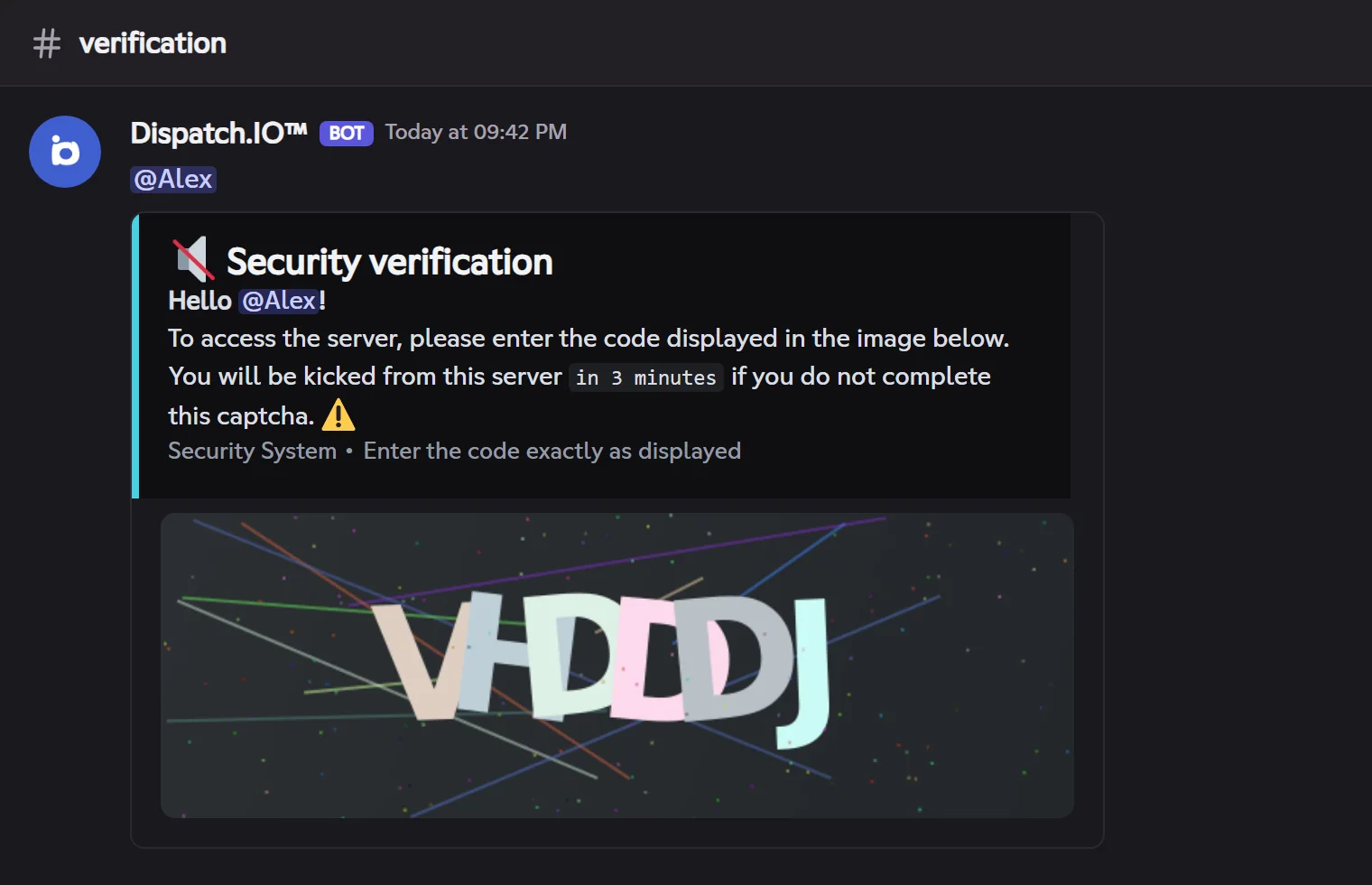
The captcha asks each newcomer to type a code before accessing the community. Conditions: anti-raid on, captcha protection on and a captcha channel chosen.
- The bot posts in the captcha channel an image with a 6-character code, mentions the member and shows the delay (3 minutes by default).
- The member types the code in the channel; their messages are deleted right away, and the message shows the attempts left.
- Success: the captcha message disappears, a log is posted in the captcha logs channel, then the member gets the welcome message and roles.
- Failure: direct message, log, then kick.
Important
During the captcha, the member sees what @everyone can see: make the captcha channel visible to newcomers and keep the rest of the community for a welcome role, given only after the captcha.
Raid mode
Raid mode is an emergency button: while it is on, newcomers are kicked automatically (with a direct message) and each attempt is logged. It is turned on with !raid-mode (✅ confirmation) or on the website's Security page, and turns itself off after its maximum duration (24 hours). Turning it on and off is logged in the raid logs channel.
During raid mode, the arrival of a Dispatch.IO blacklisted account is also reported to the staff, with the emergency mentions.
Whitelist
The whitelist exempts members, bots or roles from some protections. Each entry has a scope: Global (every protection) or a list of specific protections (App addition, Messages, Joins / recent accounts…). The owner is added as soon as the bot arrives. Nothing exempts from raid mode or the captcha.
Emergency mentions
Emergency mentions warn your staff as soon as an important log is posted (raid logs channel and sanctions logs channel): the bot adds mentions at the bottom of the log. By default, the owner is mentioned.
| Setting (Basic configuration) | Effect | Default |
|---|---|---|
| Security alerts | Turns every emergency mention on or off | On |
| Emergency roles and users | Who is mentioned | None (the owner) |
| Copy by direct message | Also sends the log by direct message (Basic or Ultimate plan) | Off |
Where to find the logs
| Channel (website's Channels page) | What security posts there |
|---|---|
| Anti-Raid & Security logs | Warnings and sanctions, accounts caught in the honeypot, kicked bots, mass joins, recent accounts, anti-raid changes, raid mode |
| Captcha validation logs | Captcha successes and failures |
| Joins & leaves logs | Arrivals during raid mode |
| Moderation & sanctions logs | Blacklisted account alerts and bans made with 🔨 |
Pitfalls and limits
- Bots added by the staff: the anti-raid also kicks bots added by the owner. Whitelist the bot before adding it.
- Fixed thresholds: only the minimum account age is set per community; for the rest, use the whitelist.
- Bot's role too low: the offending message is deleted, but the sanction fails. Move the bot's role up.